Kafka, Explained Simply (Part 1): Where It Actually Fits in a Real App
Kafka sounds scary before you use it, and surprisingly simple after. The problem is most explanations start with words like "distributed commit log" on day one. Let's not do that.
This is Part 1 of a two-part introduction to Kafka. It shows you where Kafka actually sits inside a real app, with a concrete example, in plain language. Part 2 goes a little deeper into the internals and the settings you'll actually have to touch once you start using it for real.
Where Kafka Actually Fits In a Real App
The problem, without Kafka
Say you're building an app where people place orders (food delivery, e-commerce, doesn't matter). The moment an order's status changes, say it goes from "placed" to "delivered", three different things need to happen:
- Generate the bill and invoice.
- Email the customer.
- Notify the seller.
If you didn't have Kafka, the obvious way is: the order service pushes the same event into three separate queues, one per job, and three different workers pick them up.
Sounds fine, until you ask: what happens if writing to the first queue succeeds, the second one fails, and the third one also fails? Now the seller has been told, but the customer never got an email and no invoice exists. The user doesn't know if their order even went through, so they place it again. That's a real, messy bug, and it gets worse the more queues you add.
This is the actual problem behind it: those three writes needed to happen as one atomic unit, either all of them succeed or none of them do. With three separate queues, you don't get that for free. This general problem has a name: a distributed transaction, and it's genuinely hard to solve well.
The same problem, with Kafka
Here's what changes with Kafka. Instead of three queues, you make one topic, let's call it order-status. The order service produces exactly one message into it whenever an order's status changes. That's it. One write.
On the other side, you set up three consumer groups: billing, email, and seller-notify. Here's the part that feels like magic the first time you see it: all three groups independently read the same message, in full, without you publishing it three times.
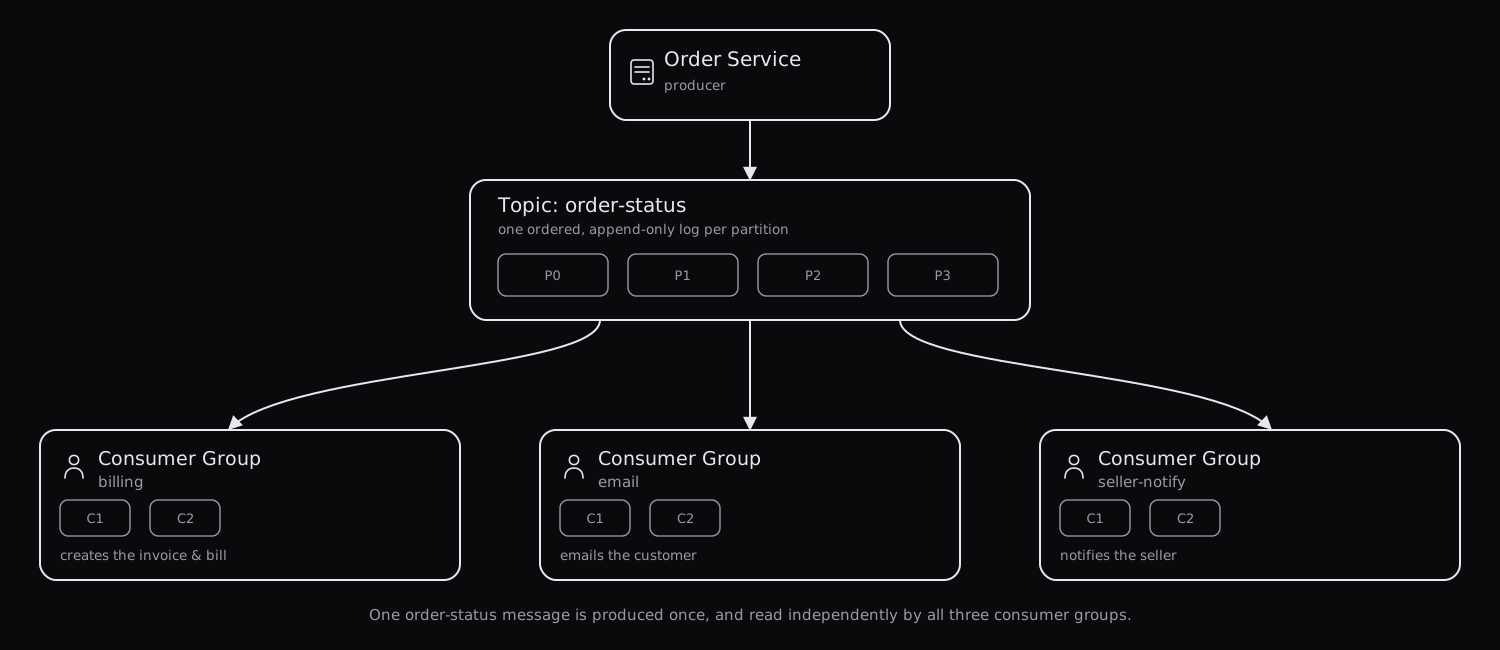 Click to view full screen
If the email consumer group is slow or temporarily down, that has zero effect on billing or seller-notify. They don't know or care about each other. And because Kafka actually keeps the message around (it doesn't delete it the moment someone reads it, more on that in Part 2), a consumer group that was offline for an hour just picks up exactly where it left off once it's back.
Bonus: say three months later you want to add fraud-detection that also needs to react to every order status change. You don't touch the order service, you don't touch billing, email, or seller-notify. You just add a fourth consumer group. The message is already sitting there, waiting.
Topics and partitions, in plain words
A topic is just a named stream for one kind of event. Think of it as a label, not a physical thing, "all order-status events go here." A real app usually has several topics for different concerns, for example:
| Topic | What goes into it |
|---|---|
order-status | Every time an order moves to a new state |
live-contest-scores | Live leaderboard updates during a contest |
user-signups | A new account was created |
Inside one topic, the actual messages live in partitions. A partition is simply an ordered list of messages that only ever gets added to, never edited, never reordered. If message A arrived before message B in the same partition, it will always stay before B. Think of it like a single long receipt roll: new entries get printed at the bottom, and old ones are never crossed out.
Why split a topic into multiple partitions at all? Because one partition can only be worked on by one consumer at a time within a group (we'll see exactly why in Part 2), so more partitions means more consumers can work in parallel, which means more throughput.
Which message goes into which partition is decided by a partitioning key, something you choose, like the order ID. The same key always lands in the same partition, which matters a lot if ordering between related messages is important to you.
Recap of Part 1
- A producer is whatever writes messages, your order service, in this example.
- A topic is a named stream of one kind of event.
- A partition is an ordered, append-only slice of a topic.
- A consumer group is a set of consumers working together to read a topic. Different consumer groups don't affect each other at all, that's exactly what let one message serve billing, email, and seller-notify independently.
Ready to go deeper into brokers, replication, offsets, and the configs that actually matter? Continue to Part 2: The Internals Everyone Asks About →